

Eaton Tripp Lite U444-003-DP8SE Type-C to DisplayPort Adapter, 8K Resolution, DisplayPort 1.4
U444-003-DP8SE
|TC-U44403DP
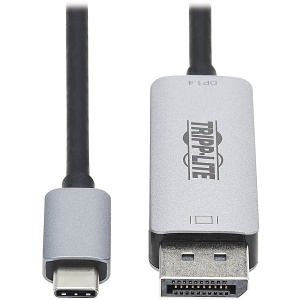
Eaton Tripp Lite U444-003-DP8SE Type-C to DisplayPort Adapter, 8K Resolution, DisplayPort 1.4
U444-003-DP8SE | TC-U44403DP
Please sign in to view pricing, availability, and to add to cart.
Product Overview
USB-C to DP Converter Gets Your Gaming, Home Theater or Digital Signage Setup 8K-Ready
This high-speed USB Type-C to DisplayPort adapter (M/M) connects a DisplayPort monitor, projector or television to the USB-C or Thunderbolt 3 port on your MacBook Pro, Windows laptop, tablet, smartphone or media center. Backward compatible with all your existing USB-C sources and DisplayPort displays, the U444-003-DP8SE is ideal for future-proofing your 1080p or 4K audio/video application in anticipation of an 8K upgrade.
Supports USB-C DisplayPort 1.4 Alternate Mode for Converting Audio/Video Signals
By connecting the USB-C cable to a source device that supports USB DisplayPort 1.4 Alt Mode, you can output 8K video and digital audio to a DisplayPort monitor, television or projector without installing special software drivers. The cable is backward compatible with DP 1.2 Alt Mode signals.
Enjoy the Clarity of 4K/8K Video with Digital Audio
The U444-003-DP8SE supports Ultra High Speed 8K video resolutions up to 7680 x 4320 at 30 Hz.
Reversible USB-C Connector Attaches in Either Direction
Unlike traditional USB cables that connect in only one direction, the reversible USB-C male connector plugs into a USB-C or Thunderbolt 3 port in either direction for an instant connection every time.
Ready to Use Right from the Package, So You Can Plug and Play Immediately
The plug-and-play USB Type-C to DisplayPort cable requires no software or external power. Just connect the USB-C plug to the USB-C or Thunderbolt 3 port on a source device that supports USB DisplayPort Alternate Mode, and connect the DisplayPort plug to your display.
Specifications
ADI Part Number TC-U44403DP Brand Name Eaton Tripp Lite Manufacturer Eaton Manufacturer Part Number U444-003-DP8SE Packaged Quantity 1 Product Line Tripp Lite Product Model U444-003-DP8SE Product Name DisplayPort/USB-C A/V Cable Product Type A/V Cable
American Wire Gauge 34AWG Cable Type DisplayPort, USB-C Connector Plating Nickel Contact Plating Gold Device Supported Audio/Video Box, Audio/Video Device, Digital Signage Display, Gaming Computer, Home Theater System, MacBook Pro, Monitor, Notebook, POS Device, Projector, Smartphone, Tablet, TV Jacket Material TPE
Data Transfer Rate 5 Gbit/s
Cable Length 3' Color Black, Gray Weight 0.75lb
Maximum Resolution 7680 x 4320
Limited Warranty 3-Year
Country of Origin VN Environmentally Friendly Yes Features HDCP 2.2, Plug & Play, Reversible Package Contents - U444-003-DP8SE USB-C to DisplayPort Adapter Cable, M/M, Black/Silver, 3 ft. (0.9 m)