

content loaded
Please sign in to view pricing, availability, and to add to cart.
Overview
Specifications
Documents
Product Overview
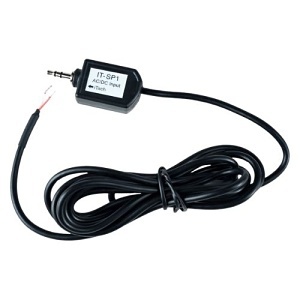
The IT-SP1 is a voltage detection sensor for DC or AC voltages within an operating range of +24V. The IT-SP1 provides an ON indication when a positive or negative voltage is applied as an input. Wiring polarity is not a concern since voltage detection is symmetric, as well as, optically isolated to avoid noise and ground loops often found in installations powered by multiply sources. Transient voltage protection is provided to avoid sensor damage from voltage surges. For DC or steady-state voltage, the IT-SP1 is ON when the voltage is above +1.2V or below -1.2V and it is OFF when the voltage is between -.8V and +.8V. Below is a diagram indicating the operating range of the IT-SP1. The IT-SP1 can indicate either an ON or OFF for voltage input in an indeterminate area. The IT-SP1 works with Alternating Current (AC) signal, providing a consistent ON/OFF threshold from 5 Hz to SKHz. The IT-SP1 was designed to work seamlessly with the iTach WF2IR and IP2IR network adapters. Before plugging the IT-SP1 3.5mm jack into an iTach IR/Sensor connector, the iTach connector must be configured as an input. Configuration is accomplished through the iTach internal web pages, by setting the IR connector to Sensor IN or Sensor Notify and pressing the "Save" button. Without anything plugged in the IR/Sensor connector, the LED indicator above it will be ON when properly configured as a Sensor input. This indicator will be OFF when the IT-SP1 is plugged into the iTach and with no voltage connected across the input. Now apply a voltage to the IT-SP1 input to change the indicator to ON. A common method to determine if a 120V, 60 Hz power source is on is to use an AC or DC wall adapter to supply a low-voltage signal to the IT-SP1. The IT-SP1 requires +5V to operate, and provides a logic level output.
Specifications
ADI Part Number GL-ITSP1 Brand Name Global Cache Manufacturer Part Number 950-0022 Product Model IT-SP1 Product Series iTach
Color Black