

Marshall V-LCD241MD 24" Full HD Monitor with Waveform Overlay, Audio Bars, Loud Speakers and HDMI Loop-Out
V-LCD241MD
|99-VLCD241MD
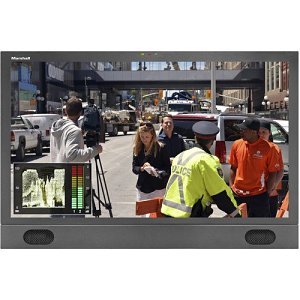
Marshall V-LCD241MD 24" Full HD Monitor with Waveform Overlay, Audio Bars, Loud Speakers and HDMI Loop-Out
V-LCD241MD | 99-VLCD241MD
Please sign in to view pricing, availability, and to add to cart.
Product Overview
- Full HD 1920 x 1080 display
- HDMI input / output standard
- Modular design. Allows addition of 3GSDI input
- Waveform monitor at the push of a button
- Audio meter bars overlay
- Built-in speakers and headphone jack
- Rugged 4-pin XLR power connector
- Three color (Red, Yellow, Green) Tally LED's
Marshall V-LCD241MD monitor provides excellent features in a 24-inch size. Straight-forward design with the most-used features built-in including waveform and audio bar overlays, loud speakers, programmable function buttons, three-color tally lights. Use on desktops or utilize a standard VESA mount. The V-LCD241MD base unit comes with no pre-installed module, HDMI input only.
The V-LCD241MD-3G option includes the base unit with a pre-installed MD-3GE module providing an additional 3G/HD/SD-SDI input with loop-through.
DSLR RATIO ADJUSTMENT
Marshall's new DSLR RATIO ADJUSTMENT feature allows users to scale video that does not completely fill the monitor's screen when connected via HDMI in "Record" mode on certain Canon DSLRs. This new feature allows the user to scale their DSLR video output, fill the screen, and eliminate black pillar bars with a variety of options to choose from. The user has the option of choosing between NORMAL, 3:2, 16:9, and FULL SCREEN. The DSLR RATIO ADJUSTMENT feature can be programmed to one of the front panel's four-button presets for quick and easy access.
Waveform, Audio and Clip Guide displays
The monitor incorporates both a Waveform display and Stereo Audio bars. These may be displayed separately or together in any one of the four corners of the monitor. The Stereo Audio is de-embedded from either the HDMI input (8 channels) or from the optional 3GSDI input (16 channels). Any pair of the available channels may be selected for both the display and the Headphone Output.
The Zebra function (Clip Guide) is used to visually filter data on the screen that is under a Lower Threshold or over an Upper Threshold. Data on either side of the filters can be displayed with a custom color.
False Color Filter
The False Color filter is used to aid in the setting of camera exposure. As the camera Iris is adjusted, elements of the image will change color based on the luminance or brightness values. This enables proper exposure to be achieved without the use of costly, complicated external test equipment.
Specifications
ADI Part Number 99-VLCD241MD Brand Name Marshall Electronics Manufacturer Marshall Electronics, Inc Manufacturer Part Number V-LCD241MD Product Model V-LCD241MD Product Name V-LCD241MD Widescreen LCD Monitor Product Series V Product Type LCD Monitor
Viewable Screen Size 24"
Number of Speakers 2 Speakers Yes
Backlight Technology LED Number of Screens 1 Screen Size 24"
Operating Power Consumption 24W
Aspect Ratio 16:9
HDMI Yes
Color Black, Green, Red, Yellow Depth 2.1" Height 15.1" VESA Mount Compatible Yes Weight 12.10lb Width 22.6"
Mount Type Desktop Mount
Brightness (Nit) 300 Contrast Ratio 600:1 Graphics Modes Full HD Maximum Resolution 1920 x 1080 Native Contrast Ratio 3,000:1
Limited Warranty 1-Year
Country of Origin US Features RotoMenu