

content loaded
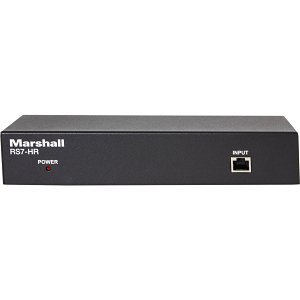
Marshall RS7-HR Rack Mountable RS232/RS422 Distribution Box for up to Pan Tilt Zoom Cameras
RS7-HR
|99-RS7HR
Shop All Marshall Electronics
Marshall RS7-HR Rack Mountable RS232/RS422 Distribution Box for up to Pan Tilt Zoom Cameras
RS7-HR | 99-RS7HR
Please sign in to view pricing, availability, and to add to cart.
Overview
Specifications
Documents
Product Overview
RS7-HR CONNECTION
The RS7-HR can be set on a desk top or you can use the included 1RU rack ears to install a rack. Please note the following:
- Before connecting your equipment please select RS232 or RS422 on the back of the unit
- Connect your controller to the Input connection on the front of the RS7-HR using a Cat 5/6 cable
- On the back of the RS7-HR connect your Cat 5/6 cables from the RS7-HR to each camera (you may need optional CV620-CABLE-07 Adapters for RS232)
- You will now connect power to the RS7-HR, you will see a red indicator light appear on the front of the unit, now you will push the refresh button once
- If you disconnect a camera or add a camera you will need to push the refresh button again
Specifications
ADI Part Number 99-RS7HR Brand Name Marshall Electronics Manufacturer Marshall Electronics, Inc Manufacturer Part Number RS7-HR Product Model RS7-HR Product Name RS7-HR Signal Splitter Product Type Signal Splitter
Maximum Operating Distance 1969'
Network (RJ-45) Yes Number of Network (RJ-45) Ports 8
Color Red
Input Voltage 5V DC
Limited Warranty 2-Year
Country of Origin TW